What is Fault Tree Analysis?
Discover what Fault Tree Analysis (FTA) is, its symbols, logic gates, and how this deductive failure analysis method helps determine root causes.
Read More →Text-driven AI Fault Tree Modeling Engine
Build engineering-grade fault trees quickly via plain text. Instantly generate HD vector fault tree topology diagrams compliant with the IEC 61025:2006 standard.
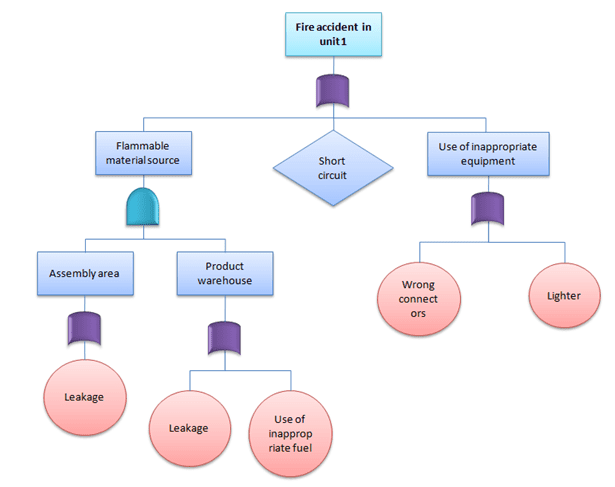
Discover what Fault Tree Analysis (FTA) is, its symbols, logic gates, and how this deductive failure analysis method helps determine root causes.
Read More →
Learn how to perform Fault Tree Analysis (FTA) step-by-step. We use a workplace fire example to demonstrate top event identification, logic gates, and probability calculations.
Read More →
A curated collection of essential Fault Tree Analysis (FTA) resources, video tutorials, free software, and international standards.
Read More →
Learn how to combine Fault Tree Analysis (FTA) with the 5 Whys method for comprehensive Root Cause Analysis (RCA) in high-reliability systems.
Read More →No manual drag-and-drop alignment required. Simply use Tab indentation to describe hierarchical relationships and add logic tags (default is [OR]). The system parses it automatically.
Powered by a D3.js layout engine, featuring millisecond-level redraws upon data modification and automatic calculation of optimal node spacing. Eliminates manual adjustments and easily handles complex topological structures.
Supports custom horizontal and vertical node spacing to ensure complex fault trees are perfectly displayed within limited canvas space.
One-click export of pure SVG vector graphics, which can be dragged directly into Visio for secondary layout editing, or directly export PNGs to insert into review reports.
Tab key to indent. The indented content below will automatically become
child events of the previous level's node.
No software download required. Build, render, and export engineering-grade topology diagrams directly in your browser.